A mixer that stays readable
Gain, pan, mute, solo, mono and meters on every strip, with A/B bus buttons right above the fader. Regular or compact density, meters before or after the fader.


Soundweave mixes your mics, games, music and calls on Windows and on macOS. Route anything anywhere, shape it with noise removal, EQ, gate and compressor, record every line, and add up to 30 virtual cables.
New to audio routing? Read what a virtual audio cable is, why Soundweave or follow a step by step guide.

Each input strip sends to any combination of hardware buses (A) and virtual buses (B). Click a route on the strip, or open the routing matrix to set a send level per route.
 Soundweavestrips · routing · DSP
Strips, buses, routing, DSP, recording and virtual devices live side by side, so you can see what is happening to every sound.
Gain, pan, mute, solo, mono and meters on every strip, with A/B bus buttons right above the fader. Regular or compact density, meters before or after the fader.
The routing matrix shows sources against buses, with a send level on every active route.

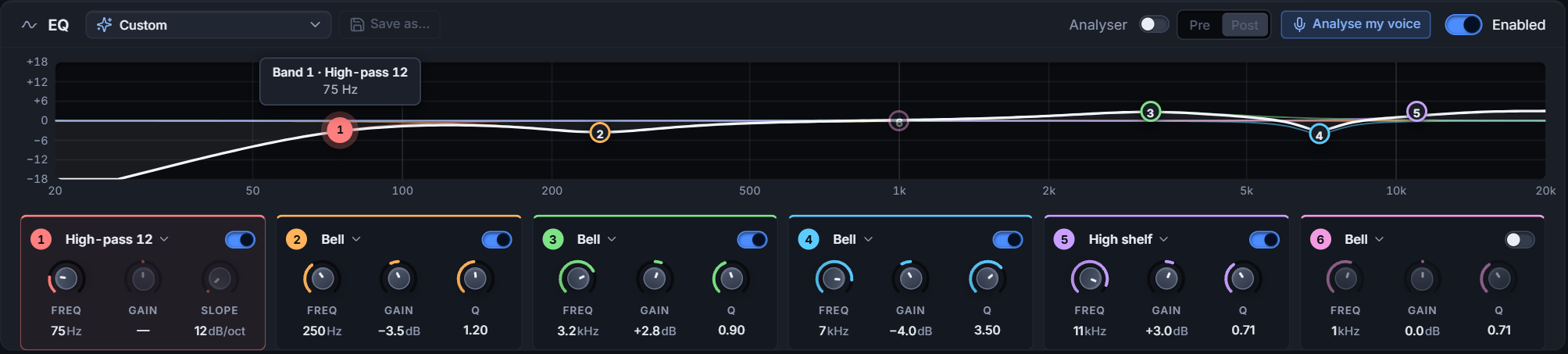
A parametric EQ on every strip and bus, with built-in presets. Not sure where to start? Analyse my voice: record about five seconds and get suggested bands. The analysis runs on your PC and the recording is deleted afterwards.
Noise removal on every input strip takes out steady background noise like fan hiss and hum. A gate on every strip, a compressor on strips and buses, and live gain-reduction meters. Add an output limit to any strip or bus.


Tick strips and buses. Save one file per line, one combined mix, or both. FLAC 24-bit, sample-aligned.

Up to four ducking groups. A priority strip lowers the strips you choose while it speaks, then they come back.


Four are free, up to 30 with a plan. Windows lists each cable as a speaker and a microphone; macOS shows it as one device with both. Either way, any app can use it.

Reads saved mixer settings files (.xml). You see a preview first, and your original files are only read, never changed.
Save your strips, buses, routing, DSP and hotkeys as a profile and switch between setups instantly.
Turn one game down and the music up while it runs, and the other way round for the next. Soundweave sets the faders when the program starts and puts them back when it closes.
Windows only.Mute, solo, fader steps, routes, profiles, ducking and a panic mute work while a game or OBS has focus.
Mute, fader, route and profile actions for Stream Deck, including the dials and touch strip of Stream Deck +.
Needs Stream Deck 6.9 or newer.Get it on the Elgato MarketplaceMove a control to bind it. Faders and knobs set volume and pan, buttons handle mute, solo, routes and profiles, also with the window closed.
Play a game, a browser or a call app into its own virtual cable, then mix each one as its own strip.
Dark, light or follow your system. Eight accent colours and interface scales from 90 to 150 %.
Steam installs new versions of Soundweave. The builds are signed.
Press one button right after you hear a glitch. You see exactly what would be sent, and nothing leaves your PC until you press Send.
Soundweave is out on Steam. $9.99 on Steam, with a free 7-day demo on the same page. One purchase covers Windows and macOS.
For Windows and macOS, on Steam. One purchase covers both.
On the same Steam page.
Soundweave is out on Steam, for Windows and macOS, and is sold there only. Buy it or start the free 7-day demo on the Steam store page.
$9.99 on Steam, one purchase for Windows and macOS. Four virtual cables are included, and Steam add-ons give 6, 8, 15 or 30. The free 7-day demo is on the same Steam page.
Windows 10 (22H2) and Windows 11, 64-bit, and macOS 14 or later on Apple Silicon. Intel Macs are not supported.
Nothing. Your installation keeps working. The download from this site is closed to new users, because Soundweave is sold on Steam only.
No. Only Virtual Cable Support asks for approval, once: a Windows administrator approval, or your password on macOS.
Never. Voice analysis runs on your PC. Usage statistics (once a day, can be switched off in Settings) and problem reports (only when you press Send) are explained in the privacy notice.
Soundweave can import a saved mixer settings file (.xml), with a preview before anything changes.
Out now on Steam for Windows 10 and 11 and macOS 14 or later. $9.99 on Steam, with a free 7-day demo on the same page.